If you want your website to appear on Google, you may have come across two terms: SEO and SERP.
Both terms relate to search engines, but they have different meanings. Understanding them can help you improve your website's visibility and attract more potential customers.
SEO is the process of improving your website's visibility. SERP is the page that displays search results.
In this guide, we will explain the difference between SEO and SERP, show how they work together, and share simple tips to help your business improve its online presence.
What Is SEO?
SEO stands for Search Engine Optimisation. It helps search engines understand your website and helps people find your pages through relevant searches.
For example, imagine you run a plumbing business in Manchester. You want people who search for "plumber in Manchester" to find your website.
SEO helps you improve your chances of appearing in relevant search results.
SEO includes three main areas: on-page SEO, technical SEO, and off-page SEO.
1. On-Page SEO
On-page SEO focuses on the content and elements of your website.
It includes writing useful content, using relevant keywords, creating clear headings, and adding links between related pages.
For example, a web development agency can create a page that explains its website design services, prices, and development process.
Clear and helpful content makes it easier for visitors to understand your services.
2. Technical SEO
Technical SEO focuses on how your website works behind the scenes.
It helps search engines access, crawl, and index your pages. It also helps you identify technical problems that may affect your website.
Important areas include:
- Website speed and performance
- Mobile-friendly design
- Website crawling and indexing
- XML sitemaps
- Broken links and technical errors
- Duplicate pages and canonical URLs
A technically sound website gives search engines a better chance of finding and understanding your content.
3. Off-Page SEO
Off-page SEO focuses on activities outside your website that can support your online reputation and visibility.
For example, you can earn backlinks from relevant websites, build relationships with other businesses, and encourage genuine customer reviews.
Quality matters more than quantity. Focus on useful content and genuine relationships instead of collecting low-quality backlinks.
What Is a SERP?
SERP stands for Search Engine Results Page.
It is the page you see after entering a search query into Google or another search engine.
For example, when someone searches for "affordable SEO services UK", Google displays results that may help them find suitable SEO providers.
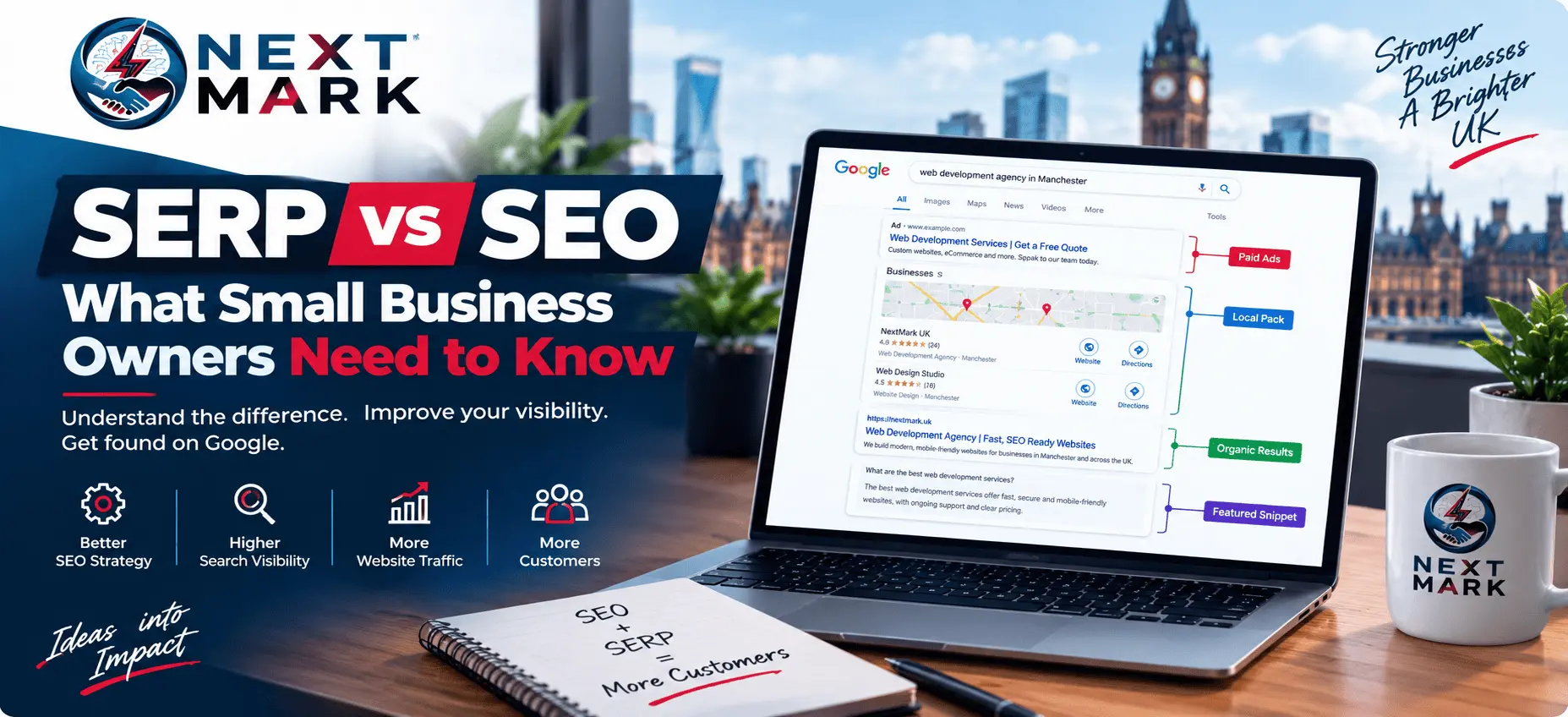
These results can include website listings, advertisements, maps, and other search features.
Let's look at the main types of results you may see on a SERP.
1. Organic Search Results
Organic results are unpaid website listings that Google displays because its systems consider them relevant to a search.
SEO helps you improve your website's chances of appearing in these results.
You do not pay Google for each click on an organic listing. However, improving your organic visibility often requires time, effort, and ongoing optimisation.
2. Paid Search Ads
Paid search ads allow businesses to promote their services through advertising campaigns.
Google may display these ads above or among other search results.
Businesses typically pay according to their advertising campaign settings. Paid advertising and SEO work differently, although businesses can use both strategies together.
3. Local Map Results
Google may show a map and local business listings when someone searches for a service in a particular area.
For example, someone searching for "web development agency in Manchester" may see local businesses, their locations, reviews, and contact details.
Local SEO helps businesses improve their visibility in relevant local searches.
You can support your local presence by keeping your Google Business Profile accurate, using relevant website content, and providing a good customer experience.
4. Featured Snippets and Other Search Features
Google sometimes highlights an answer from a webpage near the top of the results.
These highlights are called featured snippets. Google may also show People Also Ask questions, images, videos, and other search features.
Some searches also include AI Overviews. If you want to understand how these changes affect small businesses, read our guide on what works for SEO after Google's latest AI search updates.
These features give users different ways to discover information. Helpful, well-organised content can serve users better, but Google decides which features appear for each search.
SERP vs SEO: What Is the Difference?
The difference becomes easy to understand when you look at their purposes.
SEO is the work you do to improve your website's organic search visibility. A SERP is where Google displays search results.
Here is a simple comparison.
| SEO | SERP |
|---|---|
| Helps improve organic search visibility | Displays search results |
| Includes content and technical improvements | Includes organic listings and other search features |
| Requires ongoing work and monitoring | Changes depending on the search query |
| Helps you improve your search presence | Shows where your website appears in search results |
Think of SEO as preparing your business for a competition. The SERP is where you see the competing results.
Both are connected, but they are not the same thing.
How Do SEO and SERPs Work Together?
Let's use a simple example.
Imagine you run a web development agency in Manchester. You want to attract people who search for website development services.
First, you create a useful service page that explains what you offer. You write a clear title, organise the content, improve the website's technical performance, and add relevant internal links.
You may also earn backlinks from relevant websites and improve your local online presence.
Google can then crawl and evaluate your page. If Google considers it relevant, your page may appear in search results for suitable queries.
You can check its performance and identify areas for improvement.
For example, if your page receives impressions but few clicks, you could review the page title and search snippet. If visitors reach your website but do not contact you, you could improve the page content, service information, or contact form.
This shows why SEO involves more than simply adding keywords to a webpage.
Why Should Small Businesses Care About SERPs?
Your position in search results can affect how easily potential customers find your business. For a deeper look at why this matters, see why SEO is more important than ever.
However, appearing in search results is only the first step. You also need to attract relevant visitors and give them a reason to choose your services.
Here are three things small businesses should focus on.
Reach the Right Audience
Choose keywords that match your services and your customers' needs.
For example, a Manchester electrician may focus on relevant local searches rather than trying to attract visitors from places they do not serve.
This approach helps you focus on people who may actually need your services.
Encourage People to Click
Your page title and search snippet help users understand what your page offers.
Write clear titles that describe the page accurately. Make your content useful and relevant to the searcher's question.
Google may generate its own search snippet, so it does not always display your meta description exactly as written.
Turn Visitors into Customers
Once people reach your website, help them understand what you offer.
Explain your services clearly, answer common questions, and make your contact details easy to find.
A website that attracts relevant visitors and makes it easy to enquire can support your business goals more effectively than one that focuses only on rankings.
How Can You Check Your Website's SERP Performance?
Google Search Console helps you understand how your website performs in Google Search.
You can use it to discover which searches show your pages and how often people click on your results.
Follow these simple steps.
Step 1: Open Google Search Console.
Select your website property to view its search performance.
Step 2: Open the Performance report.
Choose the search results report to review your website's organic search data.
Step 3: Check impressions.
Impressions show how often your website appears in search results under Google's reporting rules.
Step 4: Review clicks and CTR.
Clicks show how many times people visit your website through search results. Click-through rate (CTR) shows the percentage of impressions that result in clicks.
Step 5: Review your search queries.
Check which keywords and phrases bring visibility to your website.
Step 6: Find opportunities to improve.
Look for pages that receive impressions but few clicks. Review their titles, content, and relevance to the searches they appear for.
You can also compare performance over time to understand whether your changes help.
Keep in mind that average position does not represent one fixed ranking for every user. Search results can vary depending on the query, location, device, and other factors.
For more guidance, visit the official Google Search Console Performance report guide.
Common SEO and SERP Mistakes to Avoid
Small businesses can waste time by focusing on the wrong SEO activities.
Avoid these common mistakes.
1. Choosing irrelevant keywords
Do not target a keyword simply because it receives searches. Make sure it relates to your services and the needs of your audience.
2. Expecting instant results
SEO takes time. Google needs to discover and evaluate changes, and no one can guarantee a specific ranking.
3. Ignoring mobile users
Many people browse websites on their phones. Make sure your pages are easy to read and use on smaller screens.
4. Building low-quality backlinks
Avoid collecting links from unrelated or spammy websites. Focus on earning relevant links that make sense for your business.
5. Measuring success through rankings alone
Rankings matter, but they do not tell the whole story. Track impressions, clicks, relevant website traffic, and customer enquiries to understand your progress.
6. Publishing content without helping readers
Do not write articles just to insert keywords. Answer real questions, explain useful concepts, and give readers practical information they can use.
Frequently Asked Questions
Is SERP the same as SEO?
No. SEO is the process of improving your website's organic search visibility. A SERP is the page that displays search results after someone enters a query.
What does SERP mean in digital marketing?
SERP means Search Engine Results Page. It can contain organic listings, paid advertisements, local maps, featured snippets, and other search features.
Does SEO control what appears on a SERP?
No. You can improve your website and its content, but Google decides which results appear and how it presents them. SEO cannot guarantee a particular ranking or search feature.
Can my business appear on Google without paying for ads?
Yes. Your website can appear in organic search results without paying for each click. You still need to create useful content and maintain your website, and results are not guaranteed. If you are budgeting for SEO, our guide to SEO packages and pricing in the UK explains what to expect.
How can I check which keywords bring visitors to my website?
Use Google Search Console. Its Performance report shows the queries associated with your website's impressions and clicks.
Why does my website get impressions but few clicks?
Your page may not match the searcher's needs, or its title may not communicate its value clearly. Competition and other search features can also affect clicks.
Review the queries that generate impressions before making changes.
How long does SEO take to show results?
There is no fixed timeline. Results depend on your website, competition, content, technical issues, and the work you complete. Monitor your progress and give changes time to take effect.
Final Thoughts
SEO and SERPs are closely connected, but they serve different purposes.
SEO helps you improve your website's organic search visibility. SERPs show the results that people see when they search online.
For small businesses, the goal should be to attract the right audience, earn relevant clicks, and turn website visits into genuine enquiries.
Start by improving your website content, fixing technical issues, and understanding what your customers search for. Then use Google Search Console to measure your progress and identify new opportunities.
If you are thinking about outside help, read how to choose the best SEO agency in the UK, compare the best affordable SEO agencies in the UK, or see our best SEO services for small businesses.
If you need professional support, explore NextMark UK's affordable SEO services. A focused SEO strategy can help you identify areas for improvement and work towards better search visibility for your business.